
The Old Way
- Calling the subject back for a better angle
- Warping limbs in Photoshop until they look fake
- Paying a director just to fix hands and shoulders
- Throwing out a good face because the pose was wrong
Reorient the subject, fix a stance, or change the gaze — without a reshoot.
Upload Your Photo *
Upload a photo and describe the pose you want.
Drop your photo here or click to browse
JPG, PNG, WebP up to 30MB
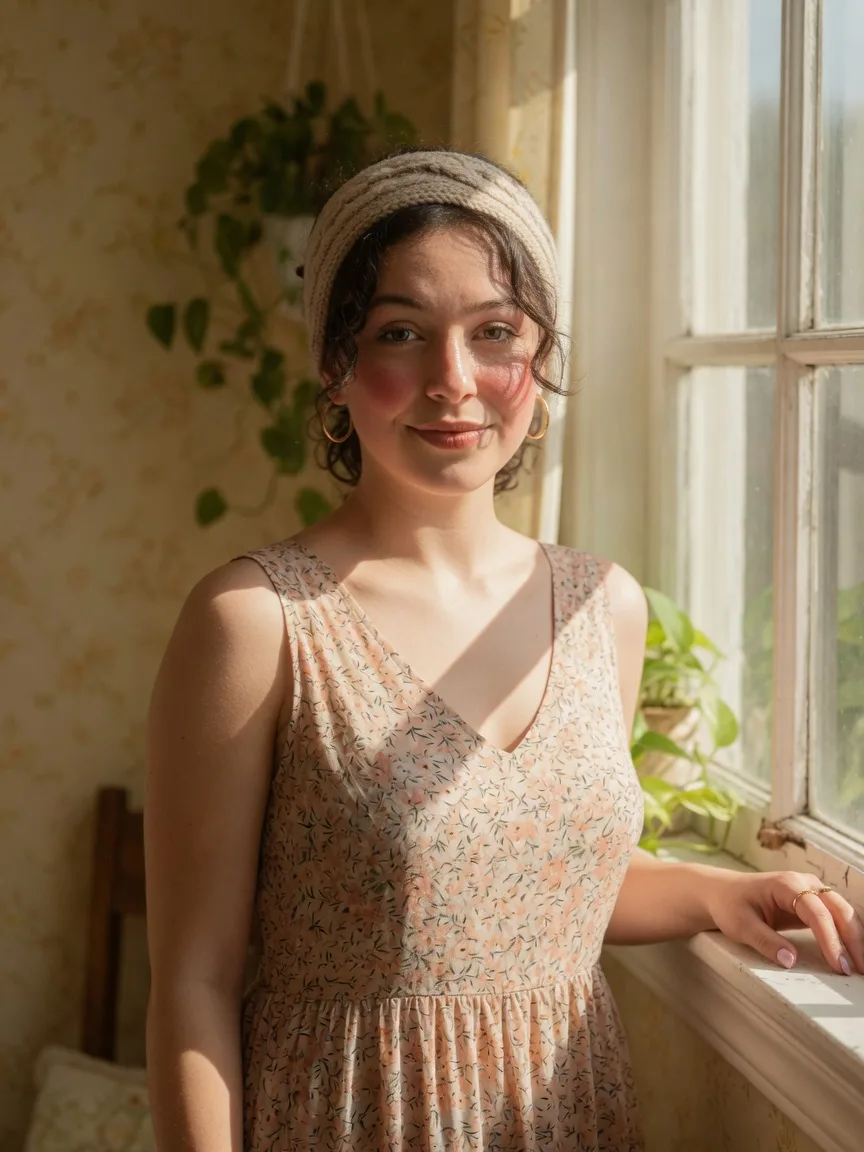
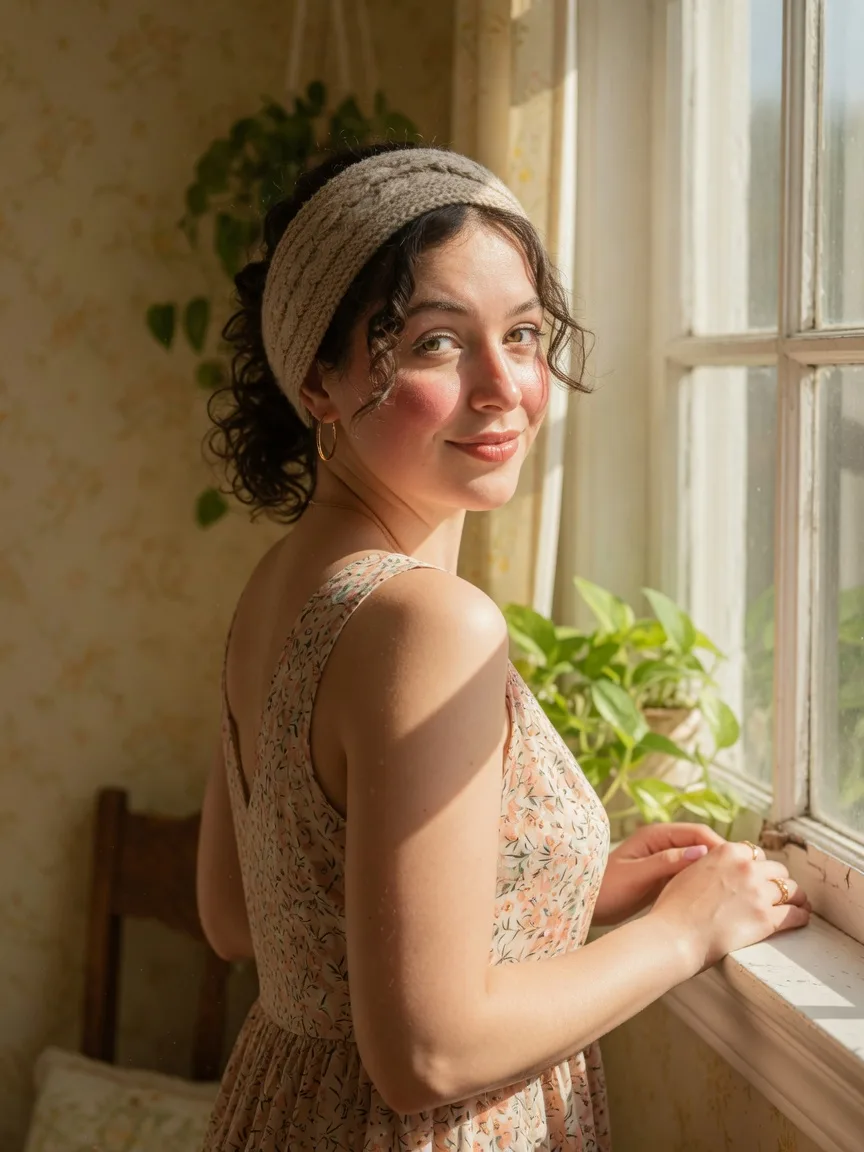 BeforeAfter
We built this pose changer because a stiff stance should not mean another shoot.
The AI Pose Changer restages a person you already like — new stance, same identity.
A good face and a stiff body. The AI Pose Changer turns the stance toward the camera without a reshoot.
Perfect for
Need a more open standing pose for a lookbook? The AI Pose Changer keeps the outfit and moves the body.
Perfect for
Change a crossed-arm or looking-away frame so a story or thumbnail reads clearer.
Perfect for
The AI Pose Changer is often used when the face is fine and the shoulders or hands are the problem.
Perfect for
Ask for a look toward the camera or a three-quarter turn. The AI Pose Changer follows the prompt.
Perfect for
A family still with a hunched stance. The AI Pose Changer can open it up without replacing the person.
Perfect for
Photographers, sellers, and anyone who would rather restage a file than book another hour.
The face landed. The stance did not. The AI Pose Changer is a second take on the same identity.
Need a more open standing pose on an existing model frame.
A stiff selfie or a family photo. If you can describe the stance, you can run the AI Pose Changer.
An AI Pose Changer should move the body and leave the person alone. This page sends your photo through GPT Image 2.5 with a system prompt that says: change only the pose. Identity, face, hair, clothing, and background stay. You type the stance you want, or you use the default standing pose.
The AI Pose Changer is an image-to-image restage. It is not a new-person generator and not a clothes swap. If the outfit is wrong, use the AI Clothes Changer. If the backdrop is wrong, use the Background Remover. Here the job is shoulders, arms, hips, and gaze.
A default prompt is ready if you do not want to write: a natural standing pose, looking toward the camera, relaxed shoulders and arms. You can replace that with something specific — “walk toward camera, weight on the front foot” — and the AI Pose Changer will try that stance.
Upload a JPG, PNG, or WebP up to 30MB. Check the pose box. Click the action. The AI Pose Changer costs 6 credits. GPT Image 2.5 does the edit. Compare the result to the original: the face should still be the same person, the clothes should still be the same clothes.
If the body twisted into a new identity, the source was probably too small, too dark, or too cropped. Try a fuller frame. The system prompt tells the model not to restyle, not to change the outfit, and not to add people. It still needs pixels to follow.
Use it when the face and wardrobe are keepers and the stance is the reject: a catalog shot with closed-off arms, a headshot that looks away, a family photo with a slump. The AI Pose Changer is cheaper than calling everyone back.
It is a poor fit for group photos where you only want one person moved, or for action sports with motion blur. A postage-stamp crop will not become a studio pose. For a tight crop that needs more canvas, use the AI Image Expander first, then restage.
6 credits a run, up to 30MB, JPG / PNG / WebP. No watermark. The AI Pose Changer runs in the browser. Sign in to spend credits. We do not promise a perfect skeleton on every body. Hands and overlapping limbs are the hard parts of any pose model.
You own the original. The download is a new stance on that original, not a claim that every finger will be anatomically perfect. If a hand collapses, try a simpler prompt — “arms relaxed at the sides” often beats a long director note.
Start from a photo where the full body or at least hips-up is visible. Say the pose in one sentence. Avoid asking for a new outfit or a new room in the same prompt — that fights the system prompt and the AI Pose Changer may restyle when you only wanted a stance.
After you download, check the face, the logo on a shirt, and the floor contact. If those three hold, the restage is usable. If the face drifted, rerun with a closer crop of the person and a shorter pose line.
Upload a photo, describe the stance, then generate.
Step 1
A full-body or half-body shot gives the AI Pose Changer more of the figure.
Step 2
Where they look, where the hands go, standing or seated. Then click Change Pose.
Step 3
Compare it to the original. Tweak the sentence and run again if needed.
How the AI Pose Changer restages a person, what to write, and how credits work.
An AI Pose Changer edits the stance, gaze, or hands in a photo while trying to keep the same person and clothes. This page is that tool.
Start in the browser with trial credits. Add a plan for more AI Pose Changer runs.
No. The AI Pose Changer is in the browser here.
Be concrete: “three-quarter turn, looking at camera, arms relaxed.” Vague words like “better pose” help less.
No. The AI Pose Changer is a second pass on a photo you already have.
It should not. The AI Pose Changer edits the subject you uploaded.
JPG, PNG, or WebP, up to 30MB. Avoid heavy crops that hide the body if you want a full stance change.
Each AI Pose Changer run costs 6 credits (GPT Image 2.5 at 1K under the hood). Subscription credits go first.
Hands are hard. Ask for a simpler pose (“hands in pockets”) or run again with a clearer instruction.
Yes, for a campaign draft or a listing. You still own the original.
Chain pose edits and keep every AI Pose Changer result in one workspace.