
The Old Way
- Traveling to fittings for silhouettes you may not keep
- Pinning samples that never sit on your actual photo
- Waiting weeks for a custom mockup
- Guessing from a hanger how a gown will look on you
Preview bridal silhouettes — ballgown, mermaid, A-line — on a photo you already have.
Upload Your Photo *
Upload a standing photo and a dress or garment photo to preview the look.
Drop your photo here or click to browse
JPG, PNG, WebP up to 10MB
Garment photo *
A flat-lay or product shot of the clothes
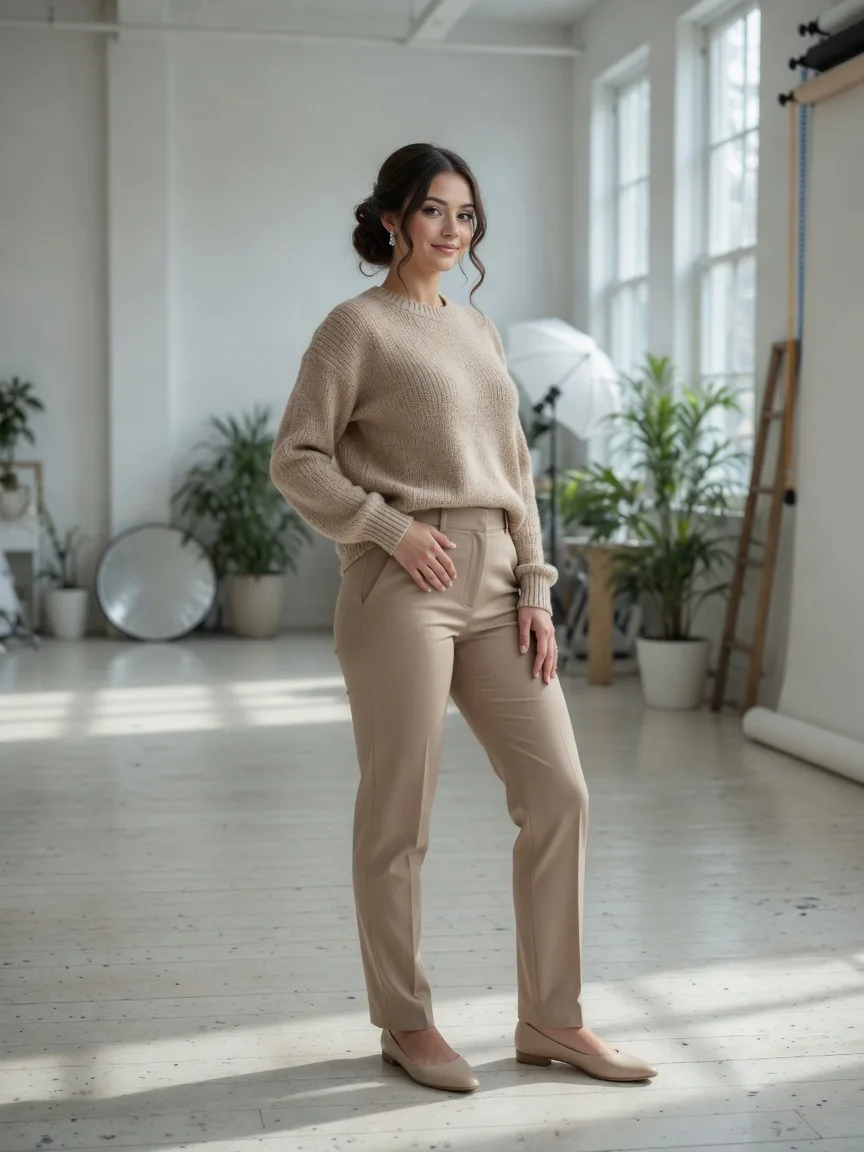
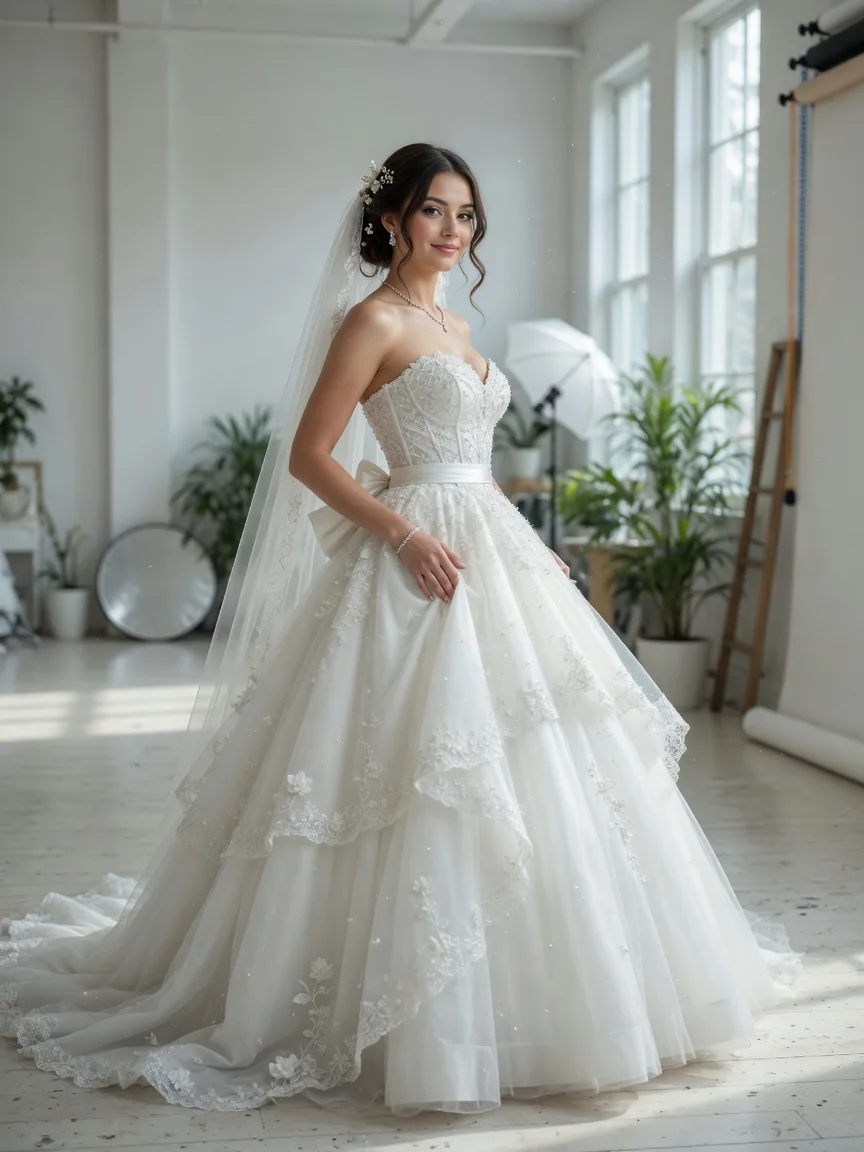 BeforeAfter
We built this try-on so a dress decision does not start with a salon appointment.
Virtual Try On is for seeing a dress on a real photo before you book the salon or the steamer.
Preview ballgown, mermaid, or A-line on your photo with Virtual Try On instead of a first-round fitting.
Perfect for
Run Virtual Try On on two or three silhouettes so the appointment starts with a short list, not a guess.
Perfect for
Send a Virtual Try On still to a partner or a planner before anyone travels for a pin fitting.
Perfect for
A hanger photo is not your body. Virtual Try On puts the sample on a photo you already have.
Perfect for
Boutiques use Virtual Try On to show a silhouette on more than one body without a full remake.
Perfect for
Not only bridal. Virtual Try On works for a formal guest look when you want the silhouette first.
Perfect for
Couples, boutiques, and anyone who wants the dress on a real body before the appointment.
A first look at the silhouette on your photo, not on a stranger on a rack.
Show a sample on more bodies with Virtual Try On before you pull it off the rack.
Build a short list with Virtual Try On stills so the fitting day is shorter.
Virtual Try On is a dress rehearsal on a photo you already have. Upload your picture and a gown or formal dress, then preview the silhouette on your body. The face stays yours. The dress changes. It is a preview for a fitting, not a replacement for fabric, alterations, or a real mirror.
Virtual Try On is the bridal and formal version of the AI Clothes Changer. Same try-on engine, same 3-credit run, same two-photo setup. The difference is the job: long gowns, trains, and event silhouettes rather than a weekend jacket. Use it to see ballgown vs mermaid vs A-line on one person.
It will not measure a bust or promise a size. Virtual Try On shows how a dress sits on your photo so you walk into a boutique with a shorter list. The real garment still needs a body and a seamstress.
Upload a full-body or three-quarter photo of the person and a photo of the dress. JPG, PNG, or WebP, up to 10MB. An optional prompt can name the silhouette. Click the try-on button. Virtual Try On keeps identity and changes the garment. 3 credits. Trial credits cover a first preview.
Stand in a simple stance if you can — arms slightly away, dress-length visible. A cropped selfie that stops at the ribs will not show a train. The engine can only drape what the frame has room for.
Helpful before a first appointment, when a partner is remote, or when a boutique wants a quick gallery of silhouettes on one model. Virtual Try On is also useful for a guest dress when you only have a hanger shot from a site.
It will not replace a bustle test, a veil, or lighting in a real hall. Heavily beaded samples and huge skirts are harder. If the dress photo hides the waist, the try-on has less to follow. For everyday clothes, use the AI Clothes Changer instead of Virtual Try On.
3 credits a run, no watermark, browser only. Virtual Try On does not ask for a prompt if the two photos are clear. Sign in to spend credits. We do not invent salon ratings or “booked 10,000 brides” numbers. The preview is as honest as the two stills.
You still own your photo. The download is for deciding, sharing with family, or briefing a boutique — not a claim that the real dress will fall the same way on the day.
Use a person photo where the body from shoulder to hem would be visible. Soft daylight beats a yellow indoor bulb. For the dress, prefer a front view on a mannequin or a model, not a pile of tulle on a bed.
If the first Virtual Try On loses the waist, try a slightly wider person crop and a dress photo that shows the bodice. Then look at the neckline and the floor. Those two spots tell you whether the silhouette is useful enough to take to a fitting.
Upload a standing photo, name the dress, then preview.
Step 1
Full-length or three-quarter works best for Virtual Try On.
Step 2
Silhouette, fabric, sleeves, veil. Then click Try On Dress.
Step 3
Save the looks you like. Bring them to a real fitting if you want.
How Virtual Try On previews a wedding dress, what to upload, and how credits work.
Virtual Try On previews a wedding dress on a photo of a real person. This page is built for that bridal look — not a full store catalog.
You can start in the browser with trial credits. Paid plans cover more Virtual Try On previews.
No. Virtual Try On runs in the browser on this page.
Usually no. Upload a person photo and a dress photo. Add a line only if the dress image shows more than one look.
No. Virtual Try On is a preview so you walk into a salon with a shortlist.
That is the goal. Virtual Try On edits the photo you upload instead of inventing a new person from text.
JPG, PNG, or WebP, up to 30MB. A standing shot with visible posture works best.
Each Virtual Try On preview costs 3 credits. Subscription credits are used first.
A cropped selfie or a seated pose gives Virtual Try On less of the body. Use a standing photo when you can.
Yes, as a mock or a conversation starter. You still own the original photo.
Save every Virtual Try On look in one workspace before you book a fitting.